EN
EN
 CZ
CZ
 DE
DE
 PL
PL
 ES
ES
 FR
FR
 IT
IT
 HU
HU
 SK
SK
 UA
UA
 EL
EL
Audit trail for important changes in logistics

The truck is standing in front of the premises, the warehouse is waiting on another ramp, and the carrier claims that it arrived according to the originally confirmed time. At such a moment, there is usually no shortage of opinions. There is no common, verifiable timeline.
The Audit Log in Time Slot Control records important reservation changes so you can see who made a change, when it happened, and how the value changed. This gives operations teams a reliable starting point instead of relying only on memory, emails, or screenshots.
When the current state is not enough
The current reservation shows what is valid now. However, when dealing with an incident, you often need to know how it got into this state. Was the date changed before the vehicle arrived, or after? Who assigned a different ramp? When was the license plate corrected? Did the reservation status change manually or as part of a follow-up process?
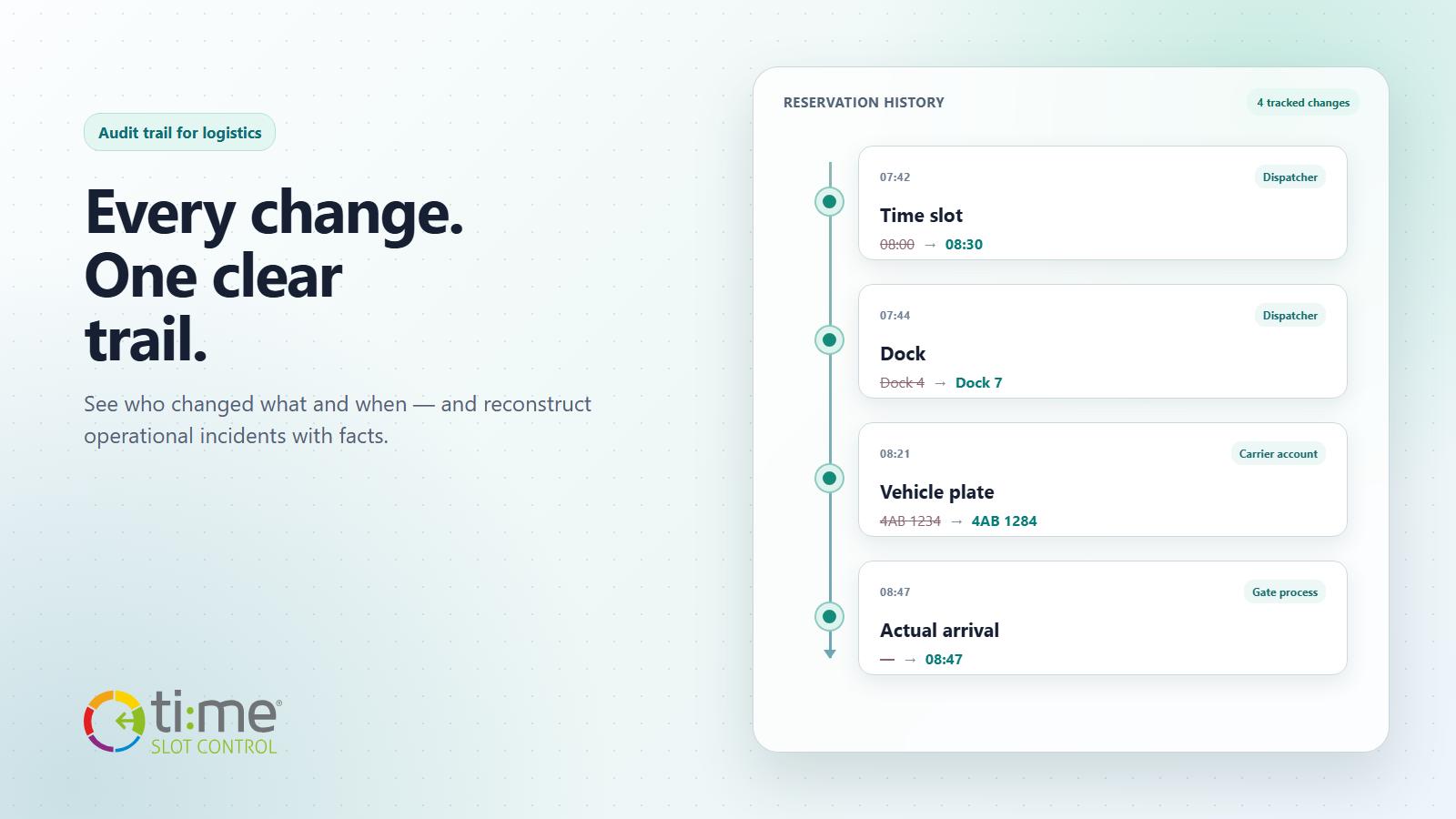
The reservation history in TSC compiles individual changes into records according to time and user account. For each monitored field, it displays its name, original value and new value. In one view, you can compare, for example:
- the planned start and end of the time window;
- An assigned ramp or other resource.
- approval status and selected operating states,
- Vehicle and semi-trailer license plate, carrier or contact details,
- the actual arrival and departure of the vehicle,
- Data of linked shipments and items, such as order, quantity, weight, or custom fields as configured.
The scope of the history corresponds to the fields that are tracked in a given TSC version and configuration. Therefore, the audit trail is not a copy of the entire database or a record of each click. It is a targeted history of changes important to the booking process.
Illustrative incident: vehicle at the wrong dock
Let's imagine an unloading reservation scheduled for 8:00 a.m. at ramp 4. The dispatcher later shifts the time to 8:30 a.m. and assigns the reservation to ramp 7. Shortly before arrival, the carrier corrects the license plate. The vehicle is registered at the gate at 8:47 a.m.
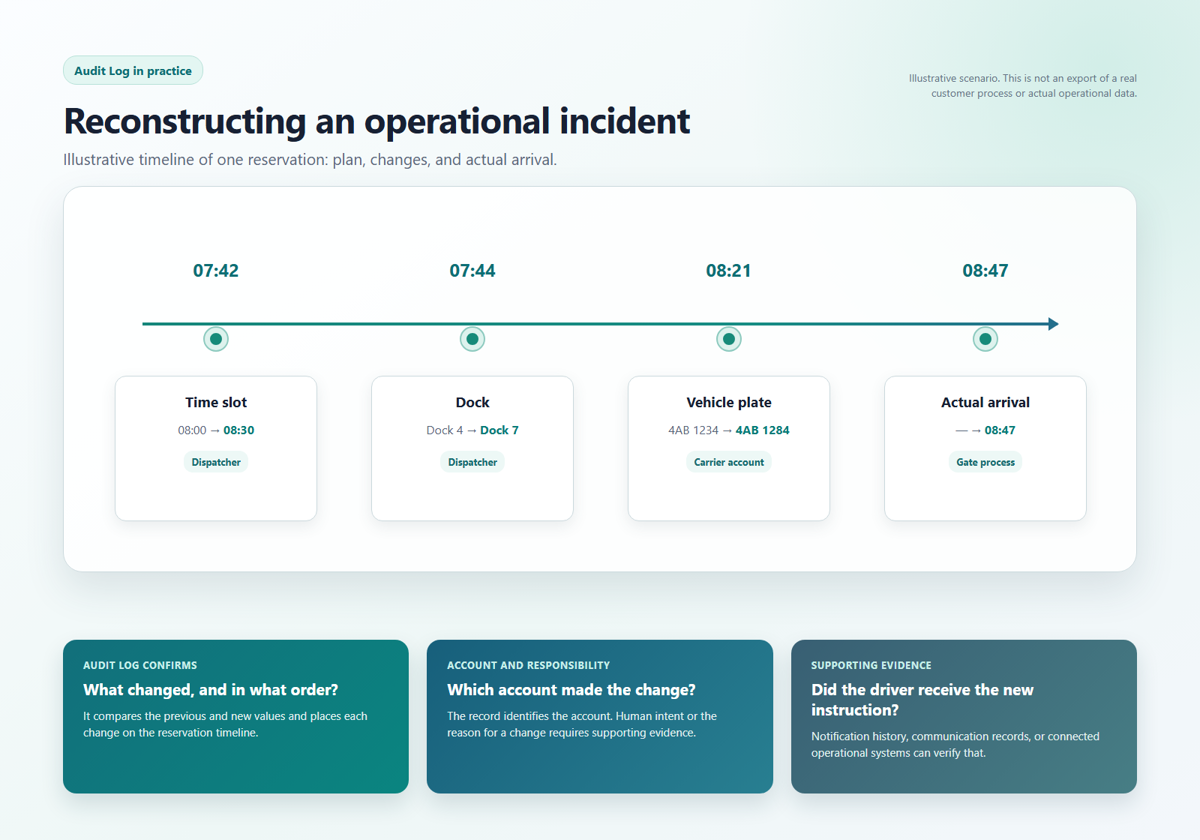
When the driver heads to the original ramp, the audit trail will help separate several different questions. It will confirm whether the change of the ramp actually took place, at what time it was deposited and under which account. It will also show whether the repair of the license plate preceded the recorded arrival. However, it will not prove whether the driver received a new instruction, whether he read it or why the user made the change.
This distinction matters. The Audit Log provides a reliable foundation for the timeline. Depending on the incident, a complete conclusion also requires supporting evidence: notification history, communication with the carrier, gate records, integration data, or internal operating procedures.
How to investigate the cause
- Determine the specific booking and time range. Don't start with a generic statement like "someone changed the ramp". Work with the booking number, establishment, and approximate time of the incident.
- Find the decisive changes. In particular, keep track of the date, source, license plate, status and actual operating times in the booking history. Compare the original and new values.
- Compile the sequence of events. The timing of the change is often more important than its very existence. It determines whether the change occurred before the notification, arrival or start of check-in.
- Verify the account and permissions. The record shows the account under which the change was made. If your organization uses technical or shared accounts, you need to take this into account when evaluating personal responsibility.
- Fill in the related evidence. Compare the audit trail with notifications, integration logs and the physical course in the area. Only their agreement or contradiction will allow a reliable description of the cause.
- Write down the conclusion and corrective action. The output should not be just the user's name, but a specific finding: what has changed, whether the change has reached the downstream roles, and how to prevent recurrence.
Accountability without blame
The purpose of the audit trail is not to automatically mark the person who made the mistake. In logistics, changes are a common part of operations: traffic is delayed, another ramp becomes clear, an order is changed, or an erroneous information from the carrier has to be corrected.
It is more useful to ask whether the change was made by the correct role, whether it was made on time and whether further steps followed it. If it repeatedly turns out that the dispatcher moves the reservation, but the information does not reach the gateway or the driver, the problem is not in one change. It is in the process of passing on the information.
The Audit Log helps distinguish an individual action from a process or system issue. Recording the user account improves traceability; sound identity management and avoiding shared accounts make the entire history more reliable.
Where the audit trail delivers the most value
| Situation | Question for the Audit Log | Follow-up action |
|---|---|---|
| Dispute about a time slot or dock | When and under which account did the value change? | Compare it with the sent notification and communication with the carrier |
| License plate mismatch at the gate | What were the original and corrected registration numbers? | Compare the correction time with the gate passage and vehicle recognition |
| Unexpected status change | Who changed the status, and what other changes happened at the same time? | Check permissions, workflow, and any integration |
| Recurring operational exceptions | Which fields change most often in similar incidents? | Adjust the process, training, or automation |
The audit trail as part of operations management
The greatest benefit does not arise only during a formal audit. Change history helps in day-to-day operations: when handing over a shift, resolving a complaint, checking a non-standard reservation or verifying whether the integration has recorded the expected value.
Access to history in TSC is controlled by permissions and the module must be enabled in the given environment. This allows the organization to determine which roles can view the booking history. In addition to the technical settings, it is also worth setting up a simple internal procedure: who is investigating the incident, what sources are compared, and where the result is recorded.
A good audit trail is not a substitute for communication, monitoring, or properly set permissions. But it does combine them into a verifiable story. Instead of asking "who remembers what", the team can work with a more precise question: what has changed, in what order, and what does it mean for further action?
Want to keep important reservation changes under control?
The Audit Log can support faster incident resolution, accountability, and continuous improvement of logistics processes. Contact us. We will show you how to align change history with permissions, operational roles, and the way your site works.