EN
EN
 CZ
CZ
 DE
DE
 PL
PL
 ES
ES
 FR
FR
 IT
IT
 HU
HU
 SK
SK
 UA
UA
 EL
EL
Yard Safety Monitor: safety signals across sites

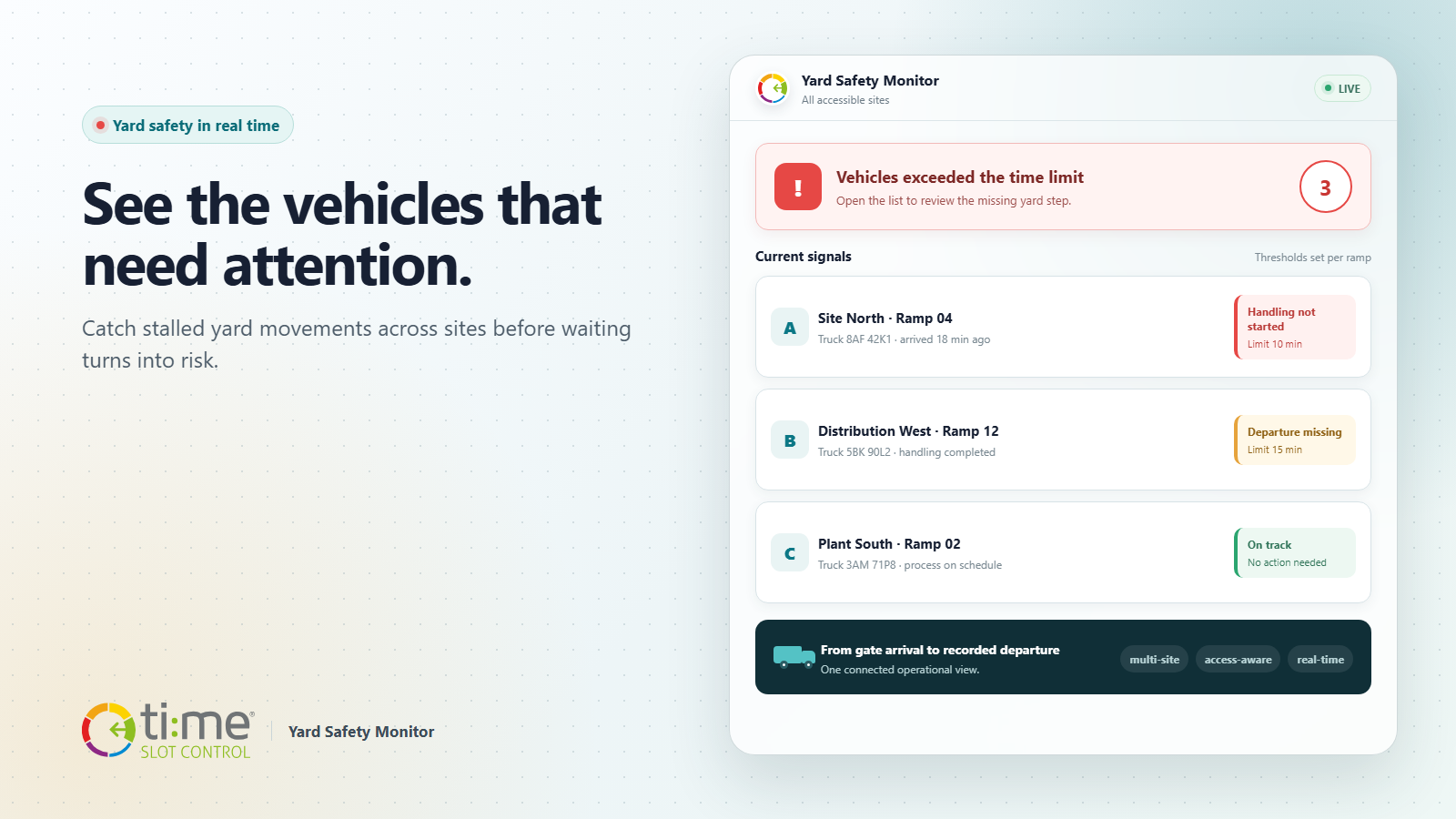
A truck entering the site does not necessarily mean that handling is moving forward. A vehicle may pass through the gate but fail to reach its ramp on time. In another case, loading or unloading may be complete while the departure is still missing from the system. These blind spots create unnecessary waiting, complicate safety coordination and can conceal an operational or security issue.
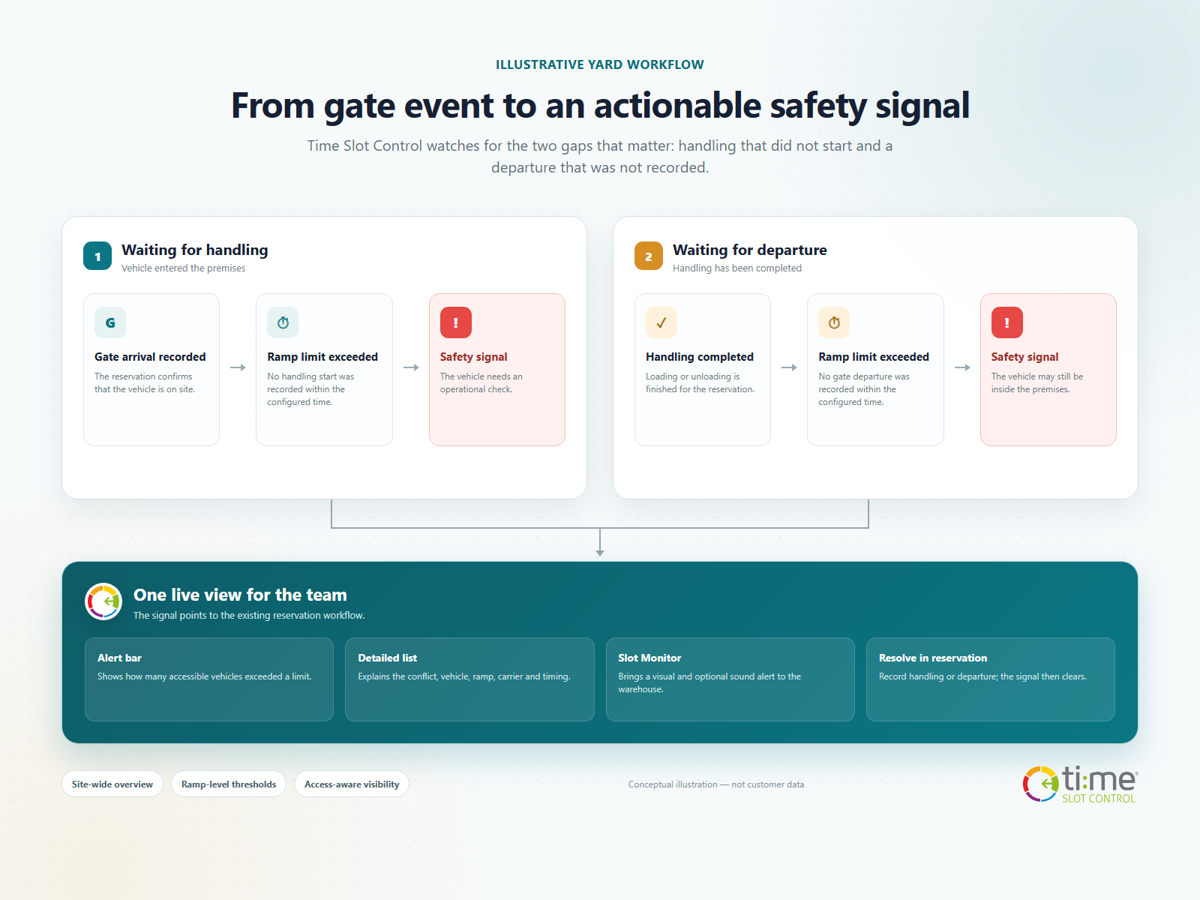
Yard Safety Monitor in Time Slot Control continuously evaluates vehicle movement between gate entry, handling and departure. When a step exceeds its configured time, the application shows the team a safety signal. It is not an isolated alarm: every signal remains connected to a specific reservation, ramp, vehicle and missing step.
Two moments that must not go unnoticed
Safety monitoring covers two practical scenarios:
- The vehicle is on site, but handling has not started. TSC recorded its arrival at the gate, but the start of loading or unloading is still missing after the configured limit.
- Handling has finished, but the vehicle has not left. Loading or unloading is complete, but no gate departure has been recorded after the limit.
Either situation may have an ordinary explanation: the driver is waiting for instructions, the vehicle is standing in the wrong place, or the next step was not recorded. What matters is that the exception does not disappear into day-to-day traffic and the responsible team learns about it in time.
One rule is not enough for every ramp
Ten minutes can be critical for a fast dispatch operation yet completely normal where weighing, document checks or a longer drive between the gate and the handling point are involved. Time Slot Control therefore supports one default time limit for the environment and an individual override for any ramp that needs it.
The operation does not have to choose between an oversensitive alarm and a warning that arrives too late. Each ramp can reflect its real route, type of handling and local conditions. A ramp without an override automatically uses the common default.
One central view across sites
A shared view is essential for companies that operate several plants or distribution centres. Safety signals are therefore not separated into independent site counters. An authorised user gets one list of relevant situations across sites while seeing only reservations on ramps they are permitted to access.
This brings together two needs that often compete:
- the central team can quickly understand what is happening at several sites,
- local operators are not distracted by vehicles at locations outside their responsibility.
Every row remains tied to a particular ramp and reservation. The user can immediately see where the signal originated and open the correct operational detail.
From a signal to the right reservation
A prominent bar at the top of the web application shows the number of accessible vehicles that exceeded a time limit. Opening it reveals the current safety signals and distinguishes between a vehicle waiting for handling to start and one that has not departed after handling finished.
The operator has the information needed for a quick decision in one place:
- the type of safety signal,
- the reservation's planned start,
- gate arrival and time spent on site,
- handling completion, when it has already occurred,
- licence plate, ramp, carrier and driver.
The list is deliberately informative. TSC does not guess why a vehicle is standing still or block traffic without context. The operator opens the reservation and uses an existing action, such as recording the start of handling or the vehicle's departure. Once the status is corrected, the live signal clears from the overview.
An alert where the warehouse team works
The same safety signal can appear in the Slot Monitor application watched by teams in the warehouse or production area. A supported monitor layout highlights the affected vehicle, displays the appropriate banner and can play an audible alert.
The web overview gives dispatchers and managers the detail they need. Slot Monitor carries the same operational priority to the handling point, where an immediate reaction may be required. Sound is reserved for Slot Monitor; the web application uses a visual warning.
One licence plate, several reservations
At some sites, the same vehicle has several consecutive reservations on one day. When the optional workflow is enabled, a gate arrival or departure can also be reflected in other reservations for the same licence plate, local day and site.
The operator does not need to repeat the same action for every reservation, and the safety overview avoids showing artificially different states for one vehicle. The setting remains optional because not every operation applies the same rule when linking reservations.
What changes in daily operations
Yard Safety Monitor does not add another complicated process. It uses timestamps that TSC already records throughout the reservation workflow and highlights only the situations that deviate from the expected flow.
- Security teams learn sooner which vehicle remains on site without a subsequent recorded step.
- Warehouse teams see whether a vehicle is waiting for handling to start or for release after completion.
- Dispatchers work with one live list instead of manually comparing gates, ramps and reservations.
- Central management gains a consistent view across sites without bypassing access permissions.
The time between an exception and a response becomes shorter. The team does not need to wait for a phone call, a physical patrol or a retrospective review of records to uncover the issue.
How to configure safety signals
The module is enabled for a specific Time Slot Control environment and access is controlled by a dedicated permission. The default time limit and any ramp-specific limits are then configured. For Slot Monitor, the appropriate profile and monitor layout are selected.
Start with limits that reflect real traffic and use the first few days to assess whether alerts identify meaningful exceptions. The aim is not to create as many alarms as possible, but to highlight vehicles that genuinely need attention.
Visibility from entry to departure
Safe yard management depends on the sequence of individual steps. Gate entry, arrival at the handling point, handling and departure should not be isolated records. When an unusual delay appears between them, Time Slot Control turns it into a specific, traceable situation for the operator.
Explore more options for connecting gates, ramps, kiosks and monitors in the Time Slot Control Yard Management overview. To configure safety monitoring around the layout of your sites and the responsibilities of individual teams, contact us.