EN
EN
 CZ
CZ
 DE
DE
 PL
PL
 ES
ES
 FR
FR
 IT
IT
 HU
HU
 SK
SK
 UA
UA
 EL
EL
One system, different branches: locally configurable workflows

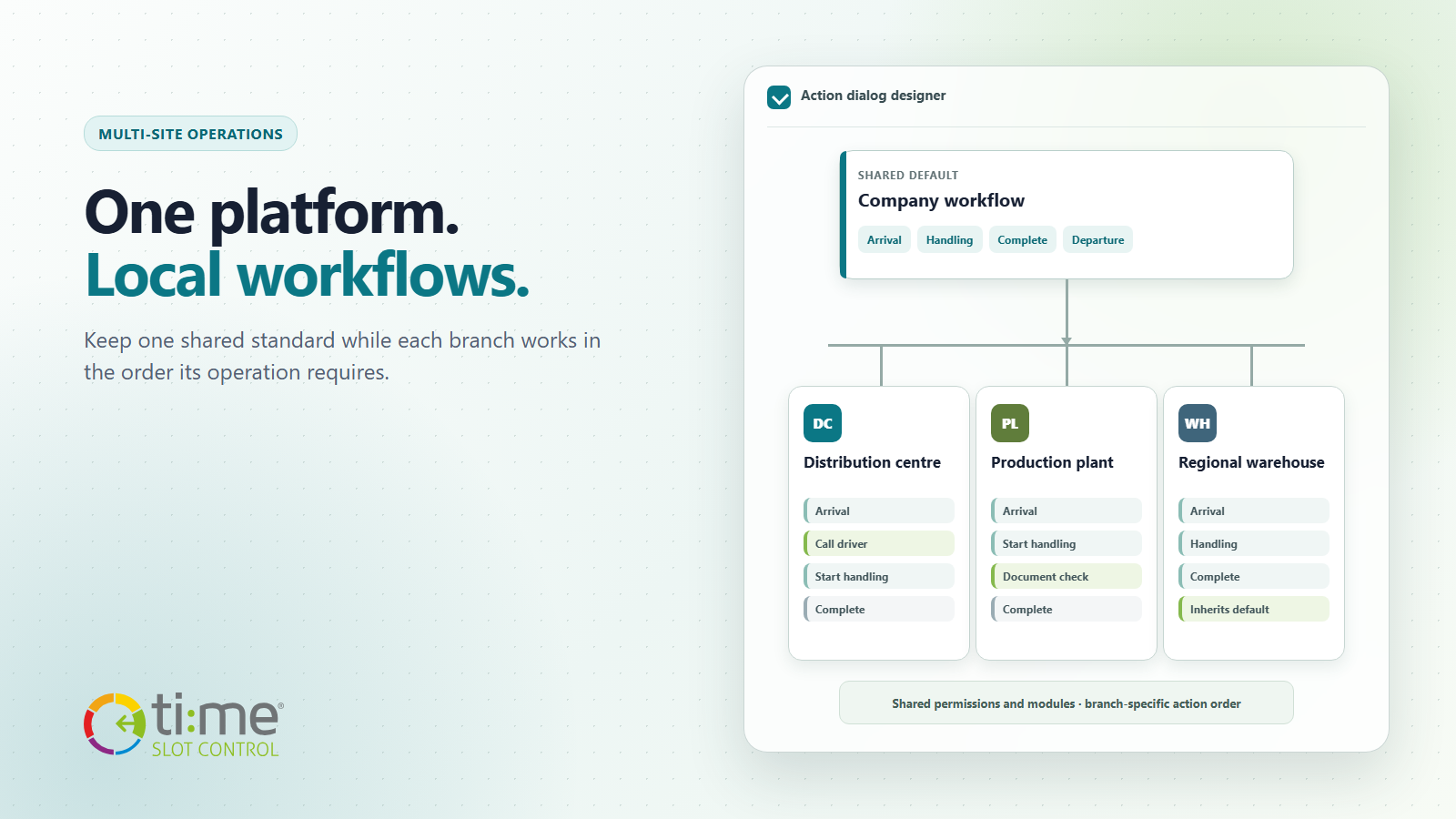
A group with three sites wants to share reservations, users, rules and reporting. Yet each site works a little differently. The distribution centre calls drivers by text message, the production plant needs a document check before the next step, and the smaller external warehouse only needs the basic sequence of arrival, handling and departure.
Creating a separate solution for every site would mean more configurations, more training and more complex administration. Forcing every branch to use the same action dialog, on the other hand, makes operators slower and increases the risk of choosing the wrong step.
Time Slot Control therefore combines a central standard with a local layout of the reservation’s main action dialog. The organisation uses one system, while the order and placement of available steps can reflect the real operation of each branch.
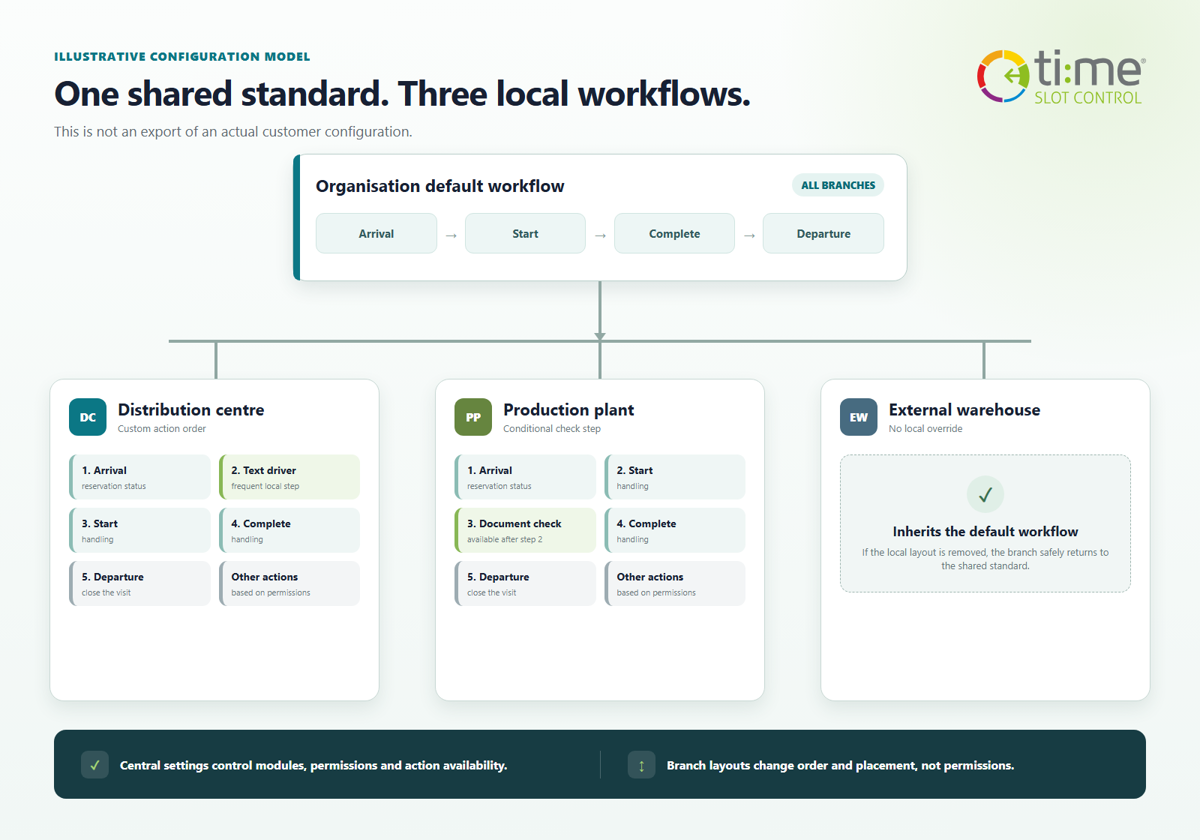
Illustrative configuration model; this is not an export of an actual customer setup.
A shared foundation, a local layout
The principle is simple:
- An administrator defines the default action layout for the entire organisation.
- Branches without their own settings automatically inherit this standard.
- A selected branch can have its own order and three-column arrangement of buttons.
- When the local settings are removed, the branch immediately returns to the shared default layout.
There is no need to maintain several separate installations or copy the entire configuration. An exception is created only where there is a genuine operational reason. A new branch can start with the company standard and receive its own layout only when its process truly differs from the others.
How branches can differ
A distribution centre with a waiting area
Operators most often record the vehicle’s arrival, contact the driver and start handling. These steps can therefore appear first. Less frequent actions remain available, but they do not slow down every check-in.
A production plant with a control step
After the arrival is recorded, a custom action can follow, such as checking documents or confirming safety requirements. The custom step can become available in the action dialog only after a selected fixed workflow state has been completed—for example, after arrival at the gate or after handling has started. The user therefore receives the next action when it makes sense in the process.
A smaller warehouse without a local exception
If a branch does not need a different procedure, it inherits the organisation’s default layout. There is no need to create and maintain another configuration simply because it is a separate site.
Local flexibility without losing central control
A branch layout is not a way to bypass permissions or enable a module that the organisation does not use. Feature availability, user permissions and visibility rules remain centrally managed. Local settings determine where the available actions appear in the main dialog and in what order operators see them.
This is especially important for larger groups. Headquarters can maintain shared safety and process rules, while individual warehouses adapt the workspace to the frequency of steps and local roles. An operator does not have to think about how another plant works; the order they see matches their own site.
Custom actions follow the actual reservation state
A workflow is more than the visual order of buttons. Time Slot Control can also link a custom action to the completion of a fixed operational step. This makes it possible to create sequences such as:
- make a document check available after the arrival has been recorded,
- offer a local checklist after handling has started,
- make a pre-departure confirmation available after handling is completed,
- offer an internal exception process after marking that the carrier did not arrive.
In the action dialog, the dependent step becomes available only after the selected prerequisite has been met. Standard cases therefore guide users through a natural sequence, while non-standard situations can still be handled according to the organisation’s permissions and settings.
What a multi-site group gains
- Unified administration: one system, shared data and centrally managed rules.
- Faster operator work: the most frequent actions are where each branch expects them.
- Fewer local workarounds: a different process does not have to be handled with instructions beside the monitor or a separate application.
- Easier expansion: a new branch starts with the standard and receives a local exception only when needed.
- Clearer changes: removing a branch layout safely returns the site to the central settings.
Start with the standard and add exceptions deliberately
The best starting point is not to create a unique workflow for every warehouse. First describe the shared minimum: which reservation states all branches use, who may change them, and which steps must remain centrally managed. Then select only the sites where a different order or a dependent custom action will genuinely speed up operations.
The result is both scalable and practical: one shared system for the entire group, with a working procedure adapted to the place where the logistics actually happen.
Learn more in the overview of Time Slot Control solutions. If you would like to design a layout for your own warehouses, plants or distribution centres, contact us.