EN
EN
 CZ
CZ
 DE
DE
 PL
PL
 ES
ES
 FR
FR
 IT
IT
 HU
HU
 SK
SK
 UA
UA
 EL
EL
Automatic time slot booking approval per order in Business Central

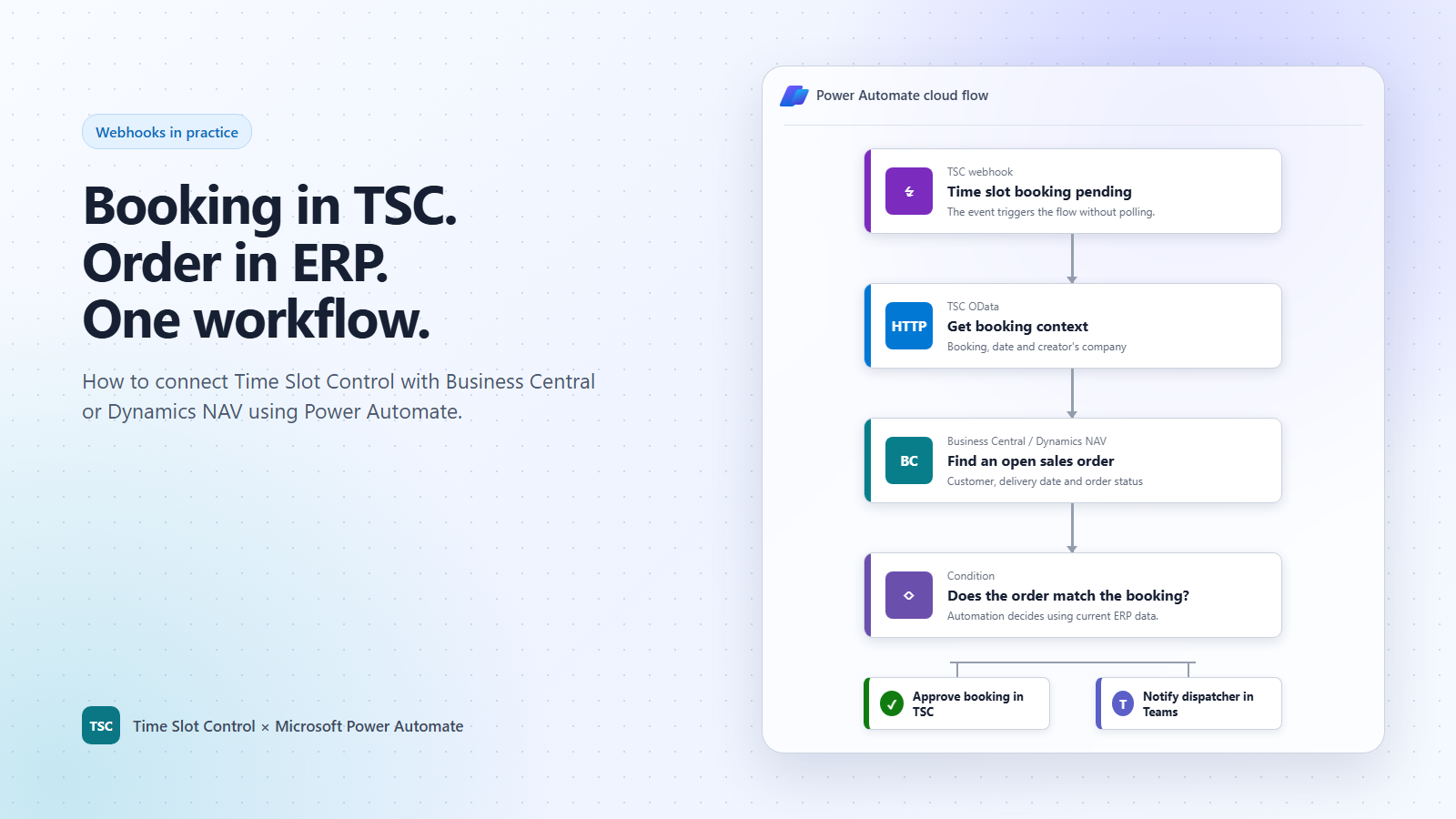
The reservation of the time window is created in Time Slot Control. However, the order according to which it is to be decided on its approval lies in ERP. How to connect both worlds without manual rewriting and without constantly querying the API?
One of the options is automated cloud flow in Microsoft Power Automate. Time Slot Control sends a webhook, Power Automate completes the necessary context via OData, verifies the order in Microsoft Dynamics 365 Business Central or Dynamics NAV and, depending on the result, approves the reservation, or notifies the dispatcher in Microsoft Teams.
Practical scenario: Approve a reservation by order in ERP
Let's imagine that a carrier creates a reservation for unloading. The operation wants to automatically approve it only when there is an open order in the ERP for the corresponding company and a scheduled delivery date.
This requirement cannot be solved by a simple rule inside the booking system. The decision depends on the current data in Business Central or NAV. Therefore, the integration combines three interfaces:
- outbound webhook from Time Slot Control as an instant trigger,
- OData to retrieve the booking and company details,
- REST API to write the result back to Time Slot Control.
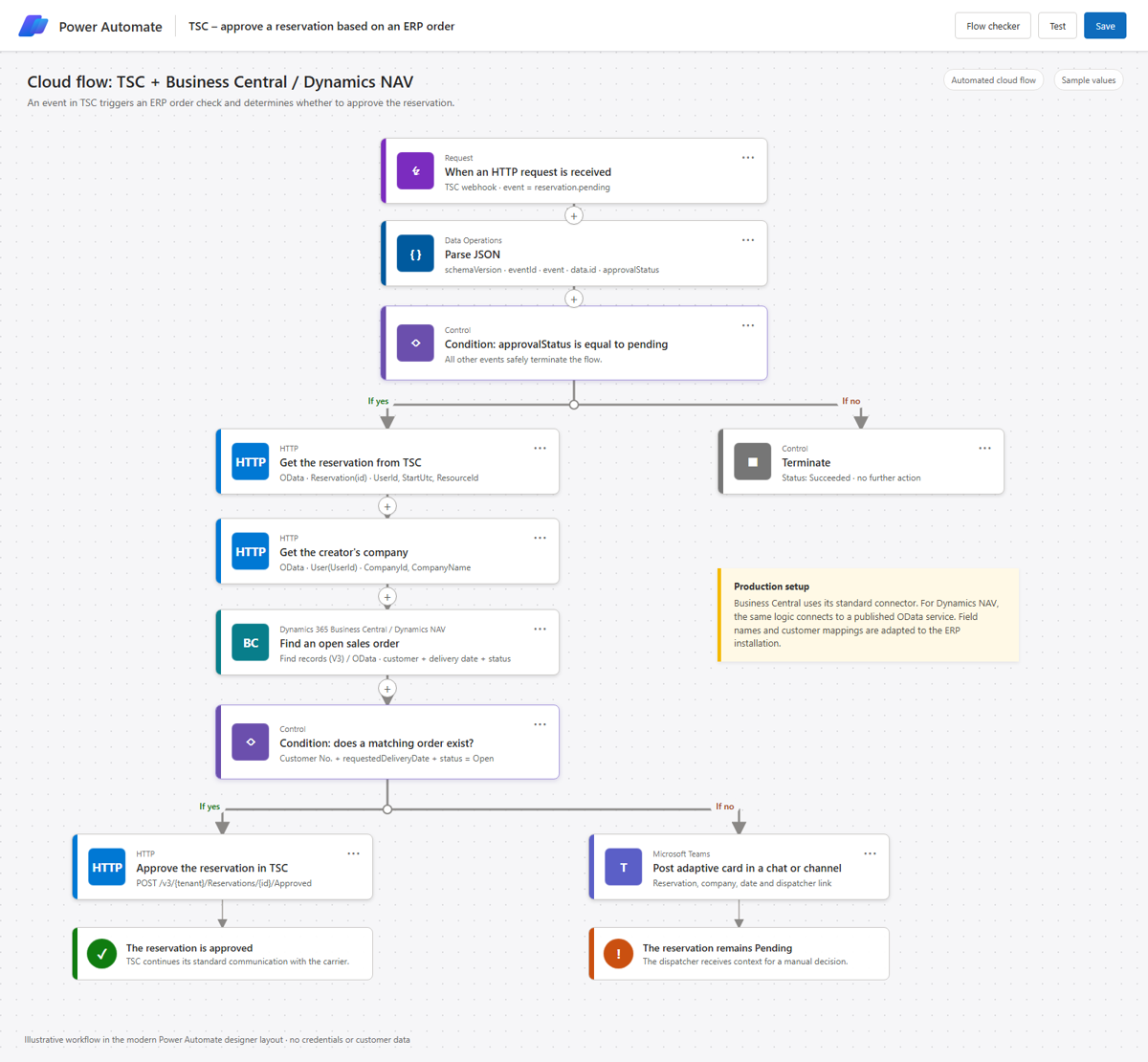
How workflow works
1. TSC sends the event without waiting for polling
Flow starts with an HTTP trigger in Power Automate. Its address is used by subscription in Time Slot Control for the event reservation.pending. This way, the integration starts when a decision needs to be made, and it doesn't have to scroll through the API every minute to look for changes.
The webhook uses a stable wrapper with schema, event ID, event type, tenant, time of origin, and brief reservation data:
{
  "schemaVersion": "1.0",
  "eventId": "7d897a13-9ac6-4d3f-9cdb-4ad2dd943be1",
  "event": "reservation.pending",
  "tenantId": "2d90ece5-b724-49b0-a19c-08e5b0a63cda",
  "occurredAt": "2026-09-18T07:58:42Z",
  "data": {
    "id": "37efcb13-f1cb-4a61-baea-adfb4337036f",
    "approvalStatus": "pending",
    "deliveryDateUtc": "2026-09-18T08:00:00Z"
  }
}
Payload is intentionally cost-effective. It doesn't contain the entire business context and doesn't become obsolete by copying dozens of fields. Power Automate retrieves the details needed for the decision only in the next step.
2. Flow completes the context of booking via OData
The first HTTP action retrieves the reservation detail from TSC, such as its number, the beginning of the time window, the source, and the user who created it. The second action detects the company of this user.
This is an important detail: the carrier company listed on the reservation does not have to be the same as the company whose user made the reservation. Therefore, the mapping to the customer number in the ERP must correspond to the specific business process.
3. Business Central or NAV validates the order
In Business Central, Power Automate can apply the standard Find records (V3) action on sales orders. A typical filter combines the customer number, the required delivery date, and the status of the order. You can add a location, warehouse, landing location, or custom integration identifier as needed.
With Dynamics NAV, the decision-making logic remains the same. Flow works with data published through the OData service of the installation. The specific entity, field names, and sign-in method are customized to the NAV version and customer settings.
Thus, Power Automate is not another database. It only coordinates steps and makes decisions over current data in TSC and ERP.
4. Found order approves the reservation
If the open order matches the booking, the flow calls the REST API action for approval:
POST /v3/{tenant}/Reservations/{id}/ApprovedTime Slot Control then continues with the standard process: the status change is visible to users and the carrier can receive a regular notification according to the customer's configuration. The integration does not bypass the existing workflow, it only automates the decision for which it has enough data available.
5. Missing order remains a task for the human
If a suitable order doesn't exist in ERP, the reservation remains in a pending approval state. Power Automate sends an adaptive card in Microsoft Teams to the dispatcher with the reservation number, company, appointment, and TSC link.
The result is not a blind rejection. The dispatcher receives the information at the right moment and can check for an exception, correct the mapping, or make a decision manually. Automation solves standard cases, one retains control over non-standard ones.
Why webhook instead of regular polling
In polling, the integration must repeatedly request data even when nothing has changed. With the growing number of tenants, reservations and connected systems, this means unnecessary traffic and more complicated time window monitoring.
The webhook reverses the direction of communication. TSC sends an event only when it actually occurs. Power Automate then retrieves only the data needed for a specific decision. The result is a faster response, fewer unnecessary requests, and clearer integration operation.
Automated booking approvals across TSC and ERP
Microsoft offers its own Power Automate connector for Dynamics 365 Business Central with actions for finding and working with records. Dynamics NAV can be connected using the appropriate connector and the published OData service, depending on the version. The difference is in the technical connection, not in the process: the event is created in TSC, ERP supplies the business context, and the result is written back to TSC.
For more information, see the Time Slot Control integrations overview, the Dynamics 365 Business Central connector documentation, and the Dynamics NAV connector.
Where else can webhooks help
Automatic booking approval is just one example. The same integration pattern can be used at other points in the process to connect TSC with Business Central, Dynamics NAV, WMS, transportation systems, or team communication.
Automatic registration of vehicle arrival
The event reservation.markedasarrival can immediately write the actual time to the ERP when the vehicle arrives, update the status of the related order, and inform the warehouse or dispatch in Microsoft Teams.
Exact loading start and end times
Webhooks reservation.processingstarted and reservation.processingcompleted pass on the actual check-in process to Business Central or WMS. The company thus obtains more accurate data for evaluating waiting, ramp performance and adherence to planned times.
Immediate reaction to carrier no-shows
An event reservation.carrier.notarrived can create an exception in ERP, notify the dispatcher and start the process for an alternate date. The problem begins to be solved immediately, not only during a subsequent manual check.
Synchronize booking changes without manual rewriting
When moving an appointment or changing a vehicle, driver or branch, the events reservation.moved, reservation.vehicle.platechanged, reservation.driver.changed and reservation.branchoffice.changed. Downstream systems thus work with the same data as TSC.
Automatic closing of transport and follow-up steps
Webhooks reservation.markedasdeparted and reservation.delivered can conclude the transport or order in ERP after departure or delivery, hand over documents for documentation and initiate further steps towards invoicing.
Do you want to verify a similar process on your own data?
The same pattern can be used not only for booking approvals, but also for order review, ramp assignment, status synchronization, or missing data alerts. First, the scenario is validated in the TSC sandbox and ERP test environment, and only then are the production systems connected.
Contact us. Together, we will design an integration workflow according to your processes, permissions and a specific version of Business Central or Dynamics NAV.