EN
EN
 CZ
CZ
 DE
DE
 PL
PL
 ES
ES
 FR
FR
 IT
IT
 HU
HU
 SK
SK
 UA
UA
 EL
EL
Connecting TSC to ERP, WMS or a gatehouse via OData and API

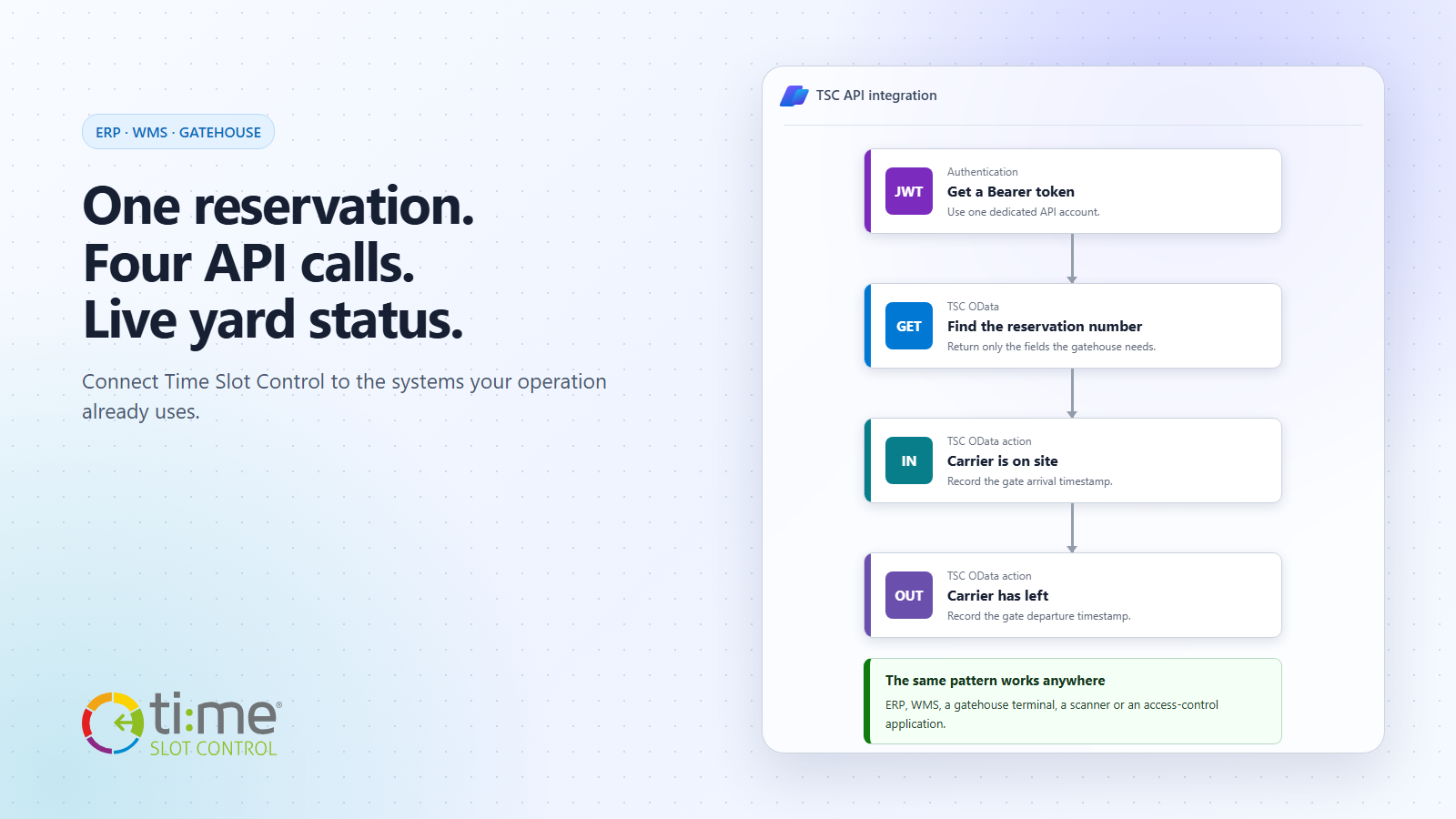
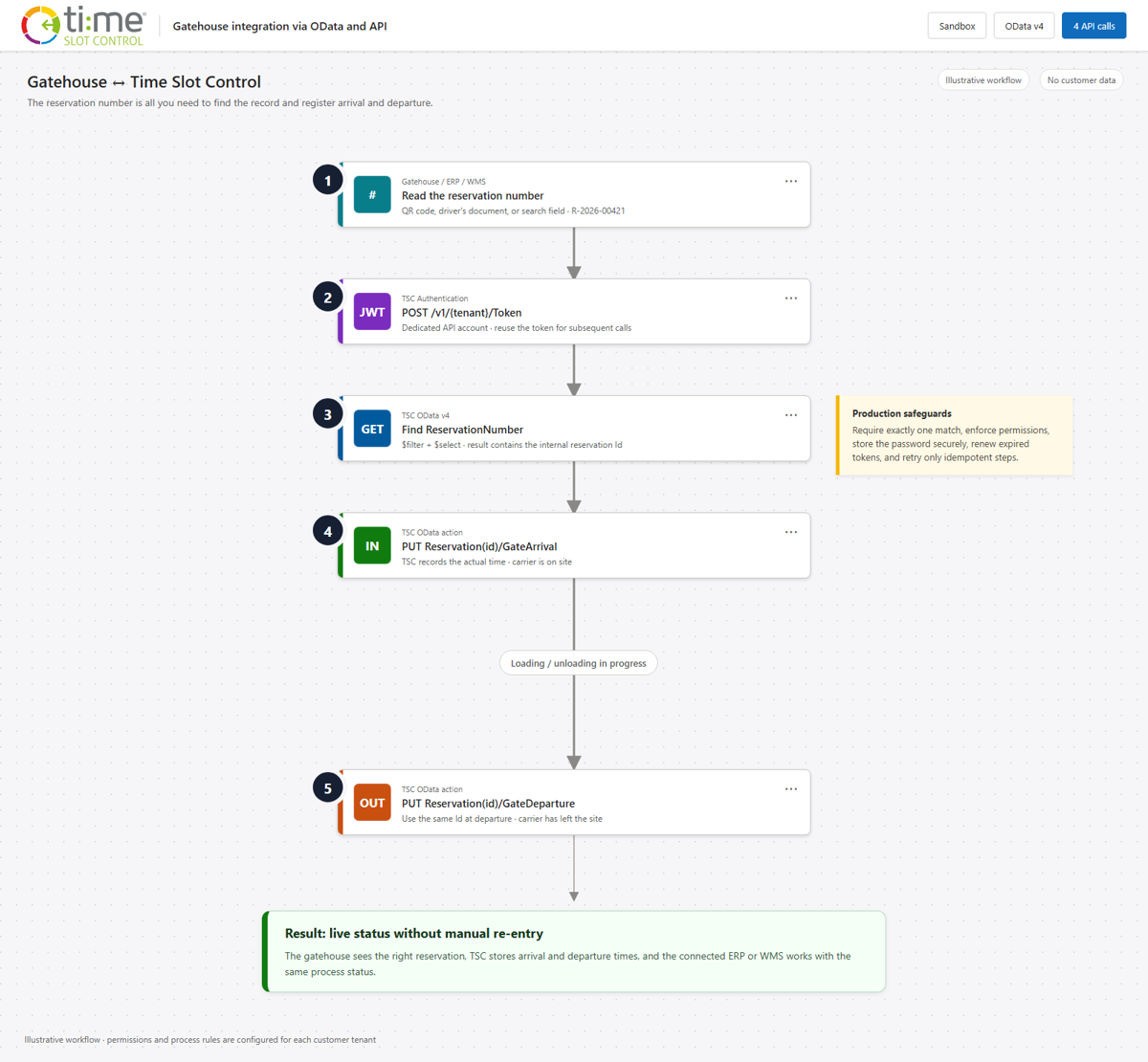
Connecting a reservation system to an ERP, WMS or gatehouse application does not have to begin as a large integration project. A practical gate-entry scenario needs only four API calls: obtain a Bearer token, find the reservation by its number, record the arrival and later record the departure.
The gatehouse operator does not need to know the reservation’s internal identifier in Time Slot Control. They work with a value the driver already has on the confirmation or in the QR code: ReservationNumber. TSC returns the matching record and its identifier Id through OData; the same identifier Id is then used for the status actions.
OData and API: two parts of one interface
Time Slot Control combines the OData v4 standard with conventional API endpoints. The responsibilities are straightforward:
- the authentication endpoint issues a JWT Bearer token,
- OData filters the data and retrieves only the fields that are needed,
- bound OData actions perform a specific process step, such as
GateArrivalorGateDeparture.
The token is therefore not obtained through an “OData query”. It is issued by the authentication endpoint of the same TSC API and then sent in the header of every OData request. Companies, orders and order rows are also available to ERP and WMS systems through OData; IntegrationId links TSC identifiers to keys in the source system.
Practical scenario: the gatehouse records entry and departure
A driver arrives at the gatehouse and presents the reservation number. The operator scans it or enters it in the existing application. The application verifies the reservation in TSC, can compare the licence plate, carrier and planned time, and records that the carrier is on site once entry is approved. At the exit, it uses the same identifier Id and marks that the carrier has left the site.
The following examples use the sandbox at https://api.tscsandbox.com. Replace the {tenant} placeholder with the name of your environment. The production API has the same structure at https://api.timeslotcontrol.com.
Before you start
Create a dedicated API account in TSC. The account needs the API access role and only the permissions the integration actually uses—particularly permission to read reservations and invoke the arrival and departure actions. Do not store the password directly in source code; use a secrets manager or the secure configuration of your integration platform.
1. Obtain a Bearer token
curl -X POST "https://api.tscsandbox.com/v1/{tenant}/Token" \
  -H "accept: application/json" \
  -H "Content-Type: application/json" \
  -d '{
    "Username": "api-gatehouse@example.com",
    "Password": "<secret-from-vault>"
  }'
The response contains the token:
{
  "token": "eyJhbGciOi..."
}
Use this value in subsequent calls as Authorization: Bearer <token>. You do not need to create a separate token for every vehicle. The integration can keep it securely in memory and renew it after it expires or after a 401 Unauthorized response.
2. Retrieve the reservation by ReservationNumber
An OData filter finds the reservation by its number. With $select, the gatehouse application retrieves only the fields it needs:
curl --get "https://api.tscsandbox.com/odata/v1/{tenant}/Reservation" \
  -H "Authorization: Bearer ${TOKEN}" \
  --data-urlencode "\$filter=ReservationNumber eq 'R-2026-00421'" \
  --data-urlencode "\$select=Id,ReservationNumber,VehicleNumberPlate,Carrier,Start,End,RealGateVehicleArrival,RealGateVehicleDeparture" \
  --data-urlencode "\$top=2"
A typical response contains an OData envelope and a value array:
{
  "@odata.context": "https://api.tscsandbox.com/odata/v1/{tenant}/$metadata#Reservation(...)" ,
  "value": [
    {
      "Id": "37efcb13-f1cb-4a61-baea-adfb4337036f",
      "ReservationNumber": "R-2026-00421",
      "VehicleNumberPlate": "1AB2345",
      "Carrier": "Example Carrier",
      "Start": "2026-09-01T12:30:00Z",
      "End": "2026-09-01T13:30:00Z",
      "RealGateVehicleArrival": null,
      "RealGateVehicleDeparture": null
    }
  ]
}
In production, continue only when the query returns exactly one record and it satisfies the operating rules. No match should be sent for manual review. If the query returns more than one record, the integration must not select the first item automatically. Using $top=2 makes this condition inexpensive to detect.
3. Mark the carrier as on site
After verifying the reservation, use the returned identifier Id in the bound GateArrival action:
curl -X PUT \
  "https://api.tscsandbox.com/odata/v1/{tenant}/Reservation(37efcb13-f1cb-4a61-baea-adfb4337036f)/GateArrival" \
  -H "Authorization: Bearer ${TOKEN}"
A successful call returns 204 No Content. TSC stores the actual arrival time and the change is immediately visible on the reservation. Downstream workflows, notifications and integrations can then follow the normal configuration of the customer environment.
4. Mark the carrier as off site at departure
At the exit, the application uses the same identifier Id. A null value tells TSC to use the current server time:
curl -X PUT \
  "https://api.tscsandbox.com/odata/v1/{tenant}/Reservation(37efcb13-f1cb-4a61-baea-adfb4337036f)/GateDeparture" \
  -H "Authorization: Bearer ${TOKEN}" \
  -H "Content-Type: application/json" \
  -d '{ "GateDepartureDateTime": null }'
If the integration device has its own trusted event time, it can send a UTC value in ISO 8601 format instead of null, for example 2026-09-01T14:32:00Z. A successful call again returns 204 No Content.
Complete minimal PowerShell example
The same procedure can be written as a short script. In practice, the arrival and departure calls run at different times, but both use the same reservation identifier Id:
$baseUri = 'https://api.tscsandbox.com'
$tenant = '<tenant>'
$reservationNumber = 'R-2026-00421'

$tokenResponse = Invoke-RestMethod `
  -Method Post `
  -Uri "$baseUri/v1/$tenant/Token" `
  -ContentType 'application/json' `
  -Body (@{
    Username = 'api-gatehouse@example.com'
    Password = '<secret-from-vault>'
  } | ConvertTo-Json)

$headers = @{
  Authorization = "Bearer $($tokenResponse.token)"
}

$safeNumber = $reservationNumber.Replace("'", "''")
$filter = [Uri]::EscapeDataString("ReservationNumber eq '$safeNumber'")
$select = 'Id,ReservationNumber,VehicleNumberPlate,Carrier,RealGateVehicleArrival,RealGateVehicleDeparture'
$queryUri = "$baseUri/odata/v1/$tenant/Reservation?`$filter=$filter&`$select=$select&`$top=2"
$result = Invoke-RestMethod -Method Get -Uri $queryUri -Headers $headers
$reservations = @($result.value)

if ($reservations.Count -ne 1) {
  throw "Expected exactly one reservation, returned: $($reservations.Count)."
}

$reservationId = $reservations[0].Id

# When entry is permitted
Invoke-RestMethod `
  -Method Put `
  -Uri "$baseUri/odata/v1/$tenant/Reservation($reservationId)/GateArrival" `
  -Headers $headers

# Later, at the exit
Invoke-RestMethod `
  -Method Put `
  -Uri "$baseUri/odata/v1/$tenant/Reservation($reservationId)/GateDeparture" `
  -Headers $headers `
  -ContentType 'application/json' `
  -Body (@{ GateDepartureDateTime = $null } | ConvertTo-Json)
The example deliberately contains no real password, tenant or customer data. A production application must also add secure secret storage, timeouts, controlled retries, correlation-ID logging, and handling for 401, 403, 404, 429 and other error responses.
Why the same pattern works for ERP and WMS
The gatehouse is a clear example because the result is immediately visible. The same principle also works inside an ERP or WMS:
- the ERP can synchronize companies, orders and order rows through OData,
- the WMS can retrieve the current reservation and prepare a dock or warehouse operation,
- the gatehouse can record arrival and departure without switching to another application,
- BI tools can read planned and actual times to evaluate waiting times and site throughput,
- outbound webhooks can notify downstream systems of changes without regular polling.
The integration therefore does not need to copy the entire data model. Each system retrieves only the data required for its own step, while TSC remains the authoritative source for the reservation and its logistics milestones.
From prototype to secure production
Verify the first version in the sandbox. The interactive API documentation at api.tscsandbox.com lets you browse endpoints, enter a Bearer token and obtain call examples immediately. The exact sign-in procedure is described in the authentication reference, while the OData guide explains the filtering options.
For production deployment, follow a few rules: use one dedicated account for each integration, grant the minimum required permissions, keep the password in secure storage, reuse a valid token, require exactly one query result and handle every error state explicitly. Design the arrival and departure calls to be safely repeatable—after success, store the identifier Id; if the outcome is uncertain, retrieve the current reservation state before trying again.
One reservation number, one current status across the process
The main benefit is not the four HTTP requests themselves. It is that the gatehouse, warehouse, dispatch team and ERP all work with the same reservation and the same timestamps. Manual re-entry, telephone verification and delayed status updates disappear.
Explore more options on the Time Slot Control API & Integrations page. To test a similar scenario for your ERP, WMS, scanner or gatehouse, start with one specific process in the sandbox. The first working connection often requires only a few precisely defined API calls.