EN
EN
 CZ
CZ
 DE
DE
 PL
PL
 ES
ES
 FR
FR
 IT
IT
 HU
HU
 SK
SK
 UA
UA
 EL
EL
From Excel to configurable import

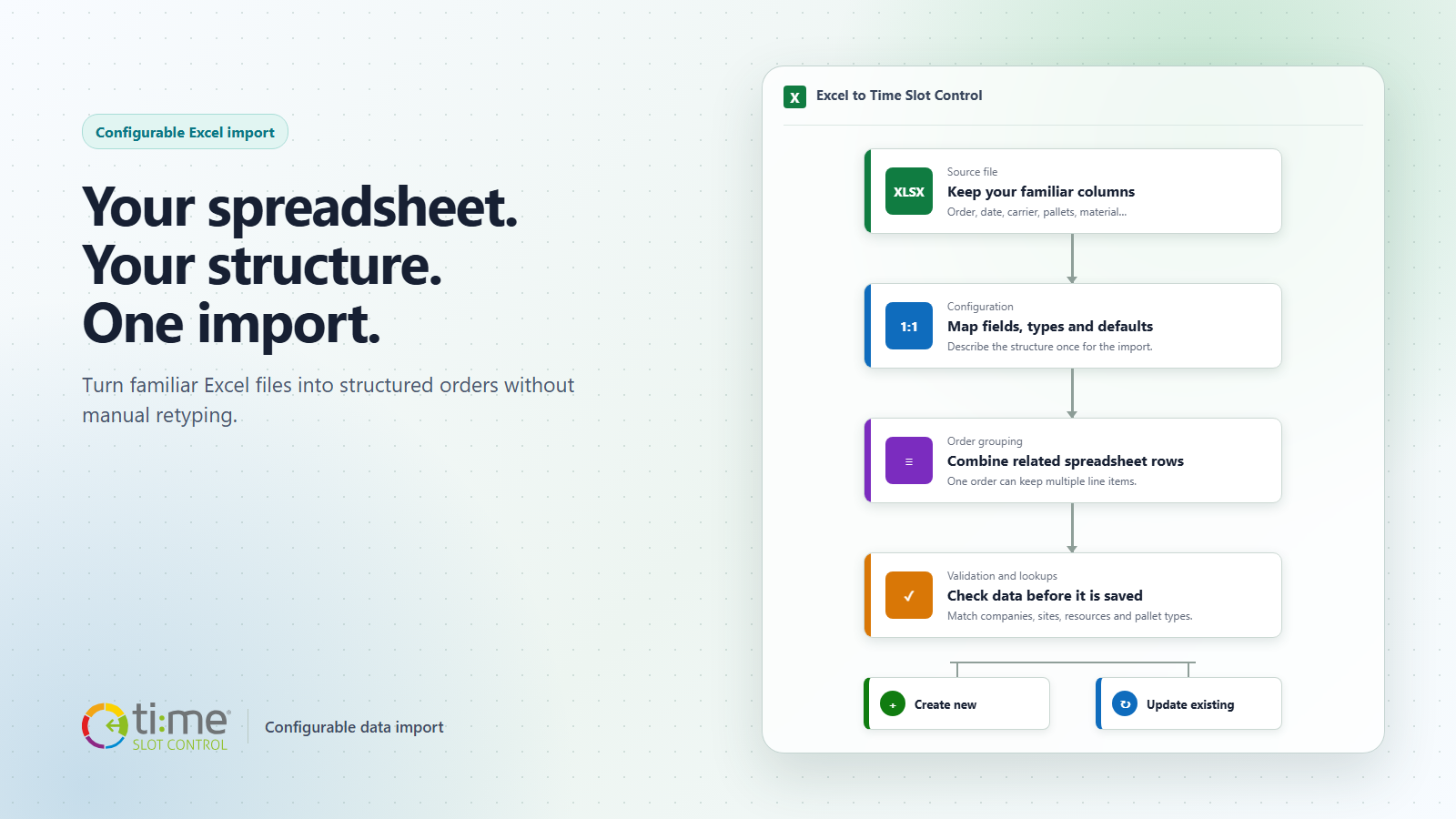
Orders, transport requests and delivery data often begin in Excel. Yet every company uses different column names, a different order of fields and a different way to split materials, pallets or dates across rows. A spreadsheet that works for one operation may not match the structure used by the next customer.
The usual answer is either to reshape the spreadsheet manually before every import or to build a dedicated importer. Configurable import in Time Slot Control adds a third option: describe the source structure once and reuse the same controlled mapping for subsequent files.
Understand the data first, then import it
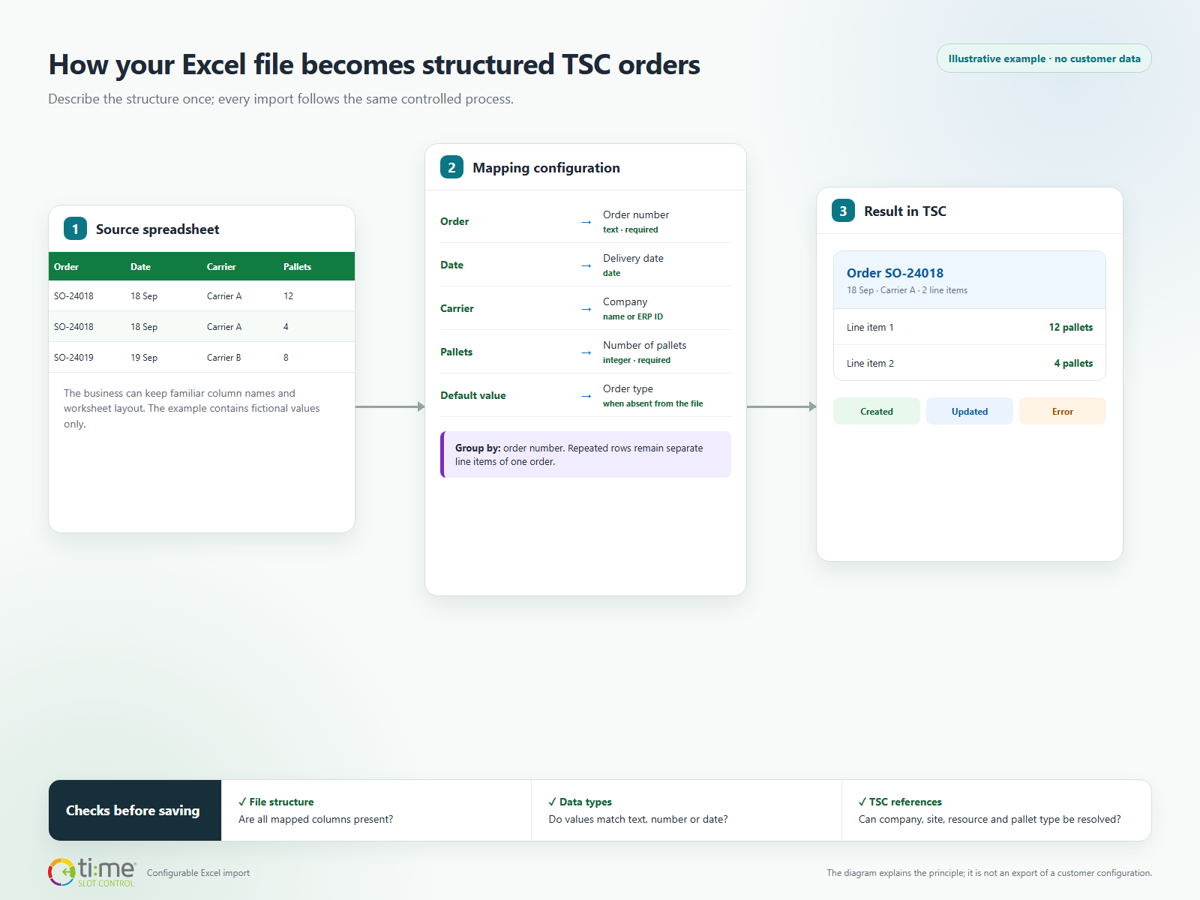
During onboarding, the team identifies the worksheet containing the source data, the header row, the first data row and the column that uniquely identifies an order. Excel column names are then mapped to fields in TSC. The configuration can distinguish text, integer, decimal and date values, and provide defaults for information that is not present in the spreadsheet.
The source file does not have to copy TSC's internal field names. A column called “Job reference” may become the order number, “Planned arrival” the delivery date and “Handling units” the number of pallets. What matters is that the mapping reflects the real meaning of the data.
Multiple spreadsheet rows, one order in TSC
An order may contain several material lines, so its number can appear on multiple rows in the source file. The configuration defines a shared key. The import groups matching rows into one order while keeping every row as a separate line item.
For example, if order SO-24018 appears once with 12 pallets and again with 4 pallets of another material, the result is not two orders. TSC creates one order with two line items. The original data structure is preserved without manually merging rows.
Connect master data instead of retyping it
The import can do more than transfer plain text. Selected values can be connected to existing TSC records by name or ERP identifier. This can resolve a carrier, customer, recipient or supplier, as well as a site, resource or pallet type.
Where the business process allows it, the configuration can also define a fallback reference for a value that is missing or cannot be resolved. The rule remains part of the shared configuration instead of being hidden in one user's manual routine.
Check the file before data is saved
The configuration also acts as a validation checklist. The import verifies that the spreadsheet contains every mapped column and that required values match the expected data type. A missing column stops an incompatible file from being processed. A problem in a specific data row is returned with information about where it occurred.
Import results distinguish records that were created, changed or rejected with an error. Users do not have to guess whether the file was processed completely and can focus only on the rows that need attention.
Repeat the import without creating a second copy
On a later import, TSC looks for an order using the configured identifier. If it does not exist, TSC creates it. If it already exists, TSC updates the order and replaces its line items with the current content of the file. Choosing a stable, correct identifier is therefore an important part of the setup.
This is also useful when the spreadsheet is generated repeatedly as an export from an ERP or another business application. Corrected data can be imported again without first finding and deleting the earlier version of the order by hand.
What changes when onboarding a new customer
- Less file preparation: customers can retain a familiar spreadsheet structure when it contains the required data.
- Less customer-specific code: supported scenarios can be described through configuration instead of a dedicated importer.
- Faster verification: changing a column name, data type or reference does not require rebuilding the whole process.
- Clearer data ownership: required columns, defaults and lookup rules are defined in one place.
Configuration does not mean importing any file without preparation
The initial setup still requires understanding the columns, selecting a stable order key and aligning source values with master data in TSC. Typical orders, repeated line items, empty values and error scenarios should be tested in a safe environment before production use.
The difference is that this work produces a repeatable configuration. Later files no longer need to be manually reshaped into one rigid template, and a new customer format does not automatically require a new piece of program code.
Would you like to use your own Excel structure without manual retyping?
We can review the structure of your file, propose the mapping and validate the import together on representative data. Explore more options on the Time Slot Control integrations page.